




1. How do you audit a website’s technical SEO foundation?
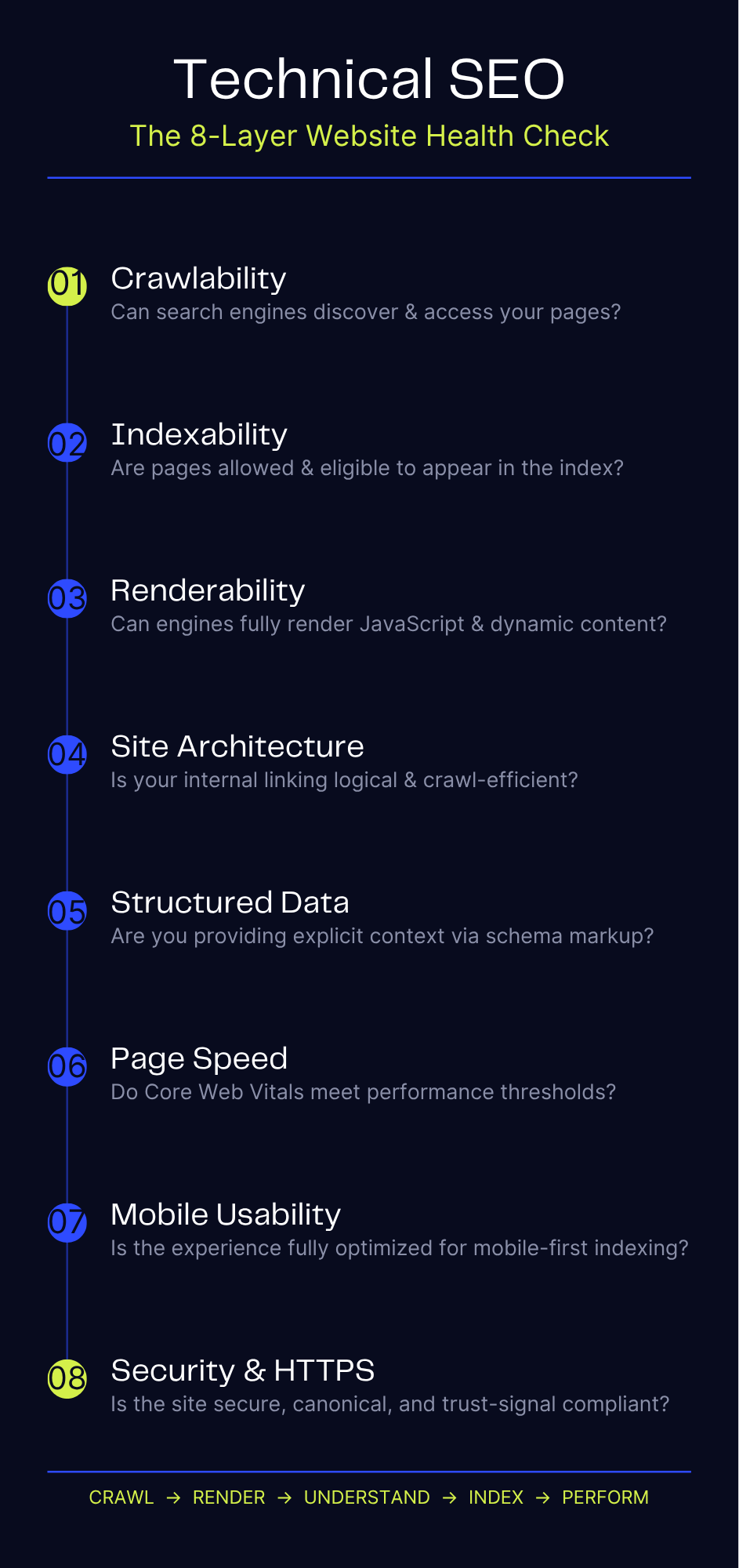
Start by establishing whether search engines can access the website correctly before investigating more advanced SEO issues. A technical audit should begin with DNS, HTTPS, server responses, crawlability, indexability and URL accessibility.
Technical SEO foundation checklist
Check | What to verify | Recommended implementation |
HTTPS | All important URLs use HTTPS | Force HTTP → HTTPS |
Preferred hostname | One canonical hostname | Redirect alternate versions |
HTTP status | Important pages return 200 | Remove accidental 4xx/5xx responses |
Redirects | Redirects point directly to final URLs | Avoid chains |
robots.txt | Important pages/resources aren’t accidentally blocked | Validate rules |
XML sitemap | Important canonical URLs are included | Submit to Search Console |
Indexability | Important pages aren’t noindex | Audit meta robots/X-Robots-Tag |
Canonical | Preferred URL is explicitly defined where appropriate | Use self-referencing canonical on indexable pages |
Internal links | Important pages are discoverable | Use crawlable <a href> links |
Mobile rendering | Content works on mobile | Test rendered pages |
JavaScript | Critical content is available to Google | Validate rendered HTML |
Server stability | No recurring 5xx/timeouts | Monitor logs and uptime |
Google recommends using both the Page Indexing report and Crawl Stats report in Search Console when investigating crawlability problems. URL Inspection is particularly useful for checking individual URLs. (Google for Developers)
2. How should you configure HTTP status codes for SEO?
Every URL should return the HTTP status that accurately describes what happened when the server received the request. Incorrect status codes can cause crawling, indexing and user-experience problems.
Use these status codes deliberately
200 OK
Use for pages that exist and are available.
HTTP/1.1 200 OK
These are normally the URLs you want search engines to evaluate for indexing.
301 / permanent redirect
Use when a URL has permanently moved.
/old-service/
/new-service/
The old URL should redirect directly to the relevant new URL.
302 / temporary redirect
Use when the move is genuinely temporary and the original URL should remain the preferred URL.
404 Not Found
Use when a requested resource does not exist and there is no relevant replacement.
410 Gone
Can be used when you intentionally indicate that a resource has been permanently removed.
5xx server errors
These indicate server-side problems and should be investigated immediately when they affect important URLs.
Google states that pages need to work and return a successful HTTP status to meet its basic technical requirements for indexing.
Technical implementation check
Run a crawl and export:
- URL
- Status code
- Redirect destination
- Redirect count
- Canonical URL
- Indexability
- Internal links
- Inlinks
- Outlinks
Then investigate:
- Important pages returning 3xx
- Important pages returning 4xx
- Important pages returning 5xx
- Redirect chains
- Redirect loops
- Redirects to irrelevant pages
- Internal links pointing to redirected URLs
Google recommends avoiding long redirect chains because they can negatively affect crawling efficiency.
3. How should you implement HTTPS and preferred URL versions?
Every public SEO URL should resolve consistently to the preferred HTTPS version and avoid duplicate protocol or hostname variants.
For example, these should not operate independently:
http://example.com
http://www.example.com
https://example.com
https://www.example.com
Choose one preferred version, such as:
https://www.example.com/
Then redirect the alternatives to it.
Check all four combinations
URL version | Expected result |
http://example.com | 301 → HTTPS preferred |
http://www.example.com | 301 → HTTPS preferred |
https://example.com | 301 → preferred hostname |
https://www.example.com | 200 |
Do not rely on canonical tags alone to solve protocol or hostname duplication.
A redirect tells both users and crawlers that the old URL has moved. Google treats permanent redirects as a strong canonicalization signal.
4. How should you audit robots.txt?
robots.txt controls crawling, not indexing.
That distinction is critical.
A typical file might look like:
User-agent: *
Disallow: /admin/
Disallow: /private/
Disallow: /search/
Disallow: /cart/
Sitemap: https://example.com/sitemap.xml
Check the following
- Does robots.txt exist?
- Does it return 200 OK?
- Is it located at the root?
- Is the syntax valid?
- Is Googlebot accidentally blocked?
- Are important CSS/JS resources blocked?
- Are valuable content directories blocked?
- Are internal search URLs blocked?
- Are parameter-heavy URLs creating crawl problems?
- Is the XML sitemap referenced?
Google specifically warns against using robots.txt to prevent a page from being indexed. If a URL should not appear in Search, allow Google to crawl it and use n oindex instead. A blocked URL can still potentially appear in search results without its content being crawled.
Important distinction
Want Google to crawl but not index?
Use:
<meta name=”robots” content=”noindex”>
Want Googlebot not to crawl a URL or resource?
Use:
Disallow: /path/
Do not confuse the two.
5. How should you build and validate XML sitemaps?
An XML sitemap should contain the URLs that you genuinely want search engines to discover and consider for indexing.
For most websites, the sitemap should contain:
- Canonical URLs
- Indexable URLs
- 200 status URLs
- Important pages
- Recently updated pages where applicable
It should generally not contain:
- Redirecting URLs
- 404 URLs
- 5xx URLs
- noindex pages
- Duplicate URLs
- Non-canonical URLs
A basic sitemap entry looks like:
<url>
<loc>https://example.com/services/seo/</loc>
<lastmod>2026-08-15</lastmod>
</url>
Use lastmod when the date accurately reflects a significant page update. Do not update it simply because the sitemap was regenerated.
Google describes sitemaps as an important way to tell it about pages that are new or updated.
Large websites
Use sitemap indexes when necessary:
/sitemap-index.xml
which can point to:
/sitemap-pages.xml
/sitemap-products.xml
/sitemap-blog.xml
/sitemap-images.xml
Then submit the sitemap or sitemap index through Google Search Console.
Technical validation
Compare:
Sitemap URLs vs crawl URLs vs indexed URLs
Look for:
- Sitemap URLs that are noindex
- Sitemap URLs returning 404
- Sitemap URLs canonicalizing elsewhere
- Important indexable URLs missing from the sitemap
- Large numbers of excluded URLs
A sitemap is a discovery and prioritization mechanism. It is not a guarantee that Google will index every URL listed in it.
6. How should you control indexability?
Indexability determines whether a page is eligible to appear in search.
Audit all indexable controls together:
Check the HTML
Look for:
<meta name=”robots” content=”index, follow”>
or simply:
<meta name=”robots” content=”index”>
There is usually no need to explicitly specify index, follow, because those are generally the default behaviours.
More importantly, identify pages containing:
<meta name=”robots” content=”noindex”>
Also check for:
X-Robots-Tag: noindex
The HTTP header is especially relevant for non-HTML resources such as PDFs.
Audit for accidental noindex
This is one of the most damaging technical SEO mistakes because a page can be perfectly crawlable while remaining excluded from the index.
Check:
- Production templates
- Staging-to-production migrations
- CMS settings
- WordPress plugins
- JavaScript-generated robots tags
- HTTP headers
- Category/tag templates
- Pagination
- Landing pages
- Product pages
Google supports robots meta tags and X-Robots-Tag for controlling how content appears in Search.
7. How should you implement canonical URLs?
Canonicalization tells search engines which URL you consider the preferred version when multiple URLs contain duplicate or substantially similar content.
For example:
https://example.com/service/
https://example.com/service/?utm_source=linkedin
https://example.com/service/?ref=campaign
The canonical URL might be:
<link rel=”canonical” href=”https://example.com/service/”>
Canonical checklist
For important indexable pages:
- Use an absolute canonical URL.
- Use HTTPS.
- Use the preferred hostname.
- Use the preferred URL format.
- Avoid canonicalizing to a redirected URL.
- Avoid canonicalizing to a 404.
- Avoid canonicalizing to a noindex page.
- Keep canonical signals consistent with the XML sitemap.
- Link internally to the canonical URL.
- Avoid conflicting canonical declarations.
A self-referencing canonical is often appropriate:
<link rel=”canonical” href=”https://example.com/services/seo/”>
Google treats redirects and rel=”canonical” as strong canonicalization signals, while sitemap inclusion is a weaker signal. These signals work best when they consistently point to the same preferred URL.
Do not use robots.txt for canonicalization
This is a common technical mistake.
If two duplicate pages exist, do not simply block one with:
Disallow: /duplicate-page/
and assume Google will understand that the other URL is canonical.
Google explicitly advises against using robots.txt for canonicalization.
8. How should you manage URL structure?
Good URL architecture makes the website easier for users and crawlers to understand.
Prefer:
example.com/services/technical-seo/
over:
example.com/page?id=938472&cat=seo
URL checklist
Use URLs that are:
- Descriptive
- Stable
- Short enough to understand
- Lowercase
- Consistently formatted
- Logically grouped
- Free from unnecessary parameters
Avoid creating multiple URL versions for the same content.
Watch for:
/training
/training/
/training?source=acrevscalers.com
/training?utm_campaign=paid-ads
/TRAINING
/training/index.html
You need a clear canonical URL model.
Google recommends organizing URLs logically and using URL structures that are intelligible to humans.

9. How should you audit internal linking for technical SEO?
Internal links are both a navigation system and a discovery mechanism.
Google uses links to discover pages and understand relationships between pages. Important pages should therefore be reachable through crawlable internal links.
Technical internal-link checklist
Every important page should:
- Have at least one crawlable internal link.
- Be reachable from another indexable page.
- Use a real <a href=””> link.
- Not depend entirely on JavaScript events for discovery.
- Have descriptive anchor text.
- Be linked from contextually relevant pages.
- Avoid unnecessary redirecting links.
- Avoid links to canonicalized-away URLs.
Google specifically recommends using standard anchor elements with an href attribute:
<a href=”/services/seo/”>Technical SEO Services</a>
rather than relying on:
<div onclick=”goToPage()”>Technical SEO</div>
or JavaScript-only navigation.
Find orphan pages
An orphan page has no meaningful internal links pointing to it.
In a crawler, compare:
All discovered/indexable URLs
against:
URLs with internal inlinks
Investigate important URLs with zero internal inlinks.
10. How should you handle JavaScript SEO?
JavaScript is not inherently bad for SEO. The technical problem occurs when important content, links, metadata or navigation depend on JavaScript that search engines cannot reliably process as intended.
Google can render JavaScript, but Googlebot’s crawling and rendering systems have constraints. Important resources should therefore be accessible and the rendered page should contain the information you expect Google to see.
Audit these elements
Check whether JavaScript controls:
- Main content
- Navigation
- Internal links
- Canonical tags
- Meta robots
- Title tags
- Structured data
- Product information
- Pricing
- Reviews
- Pagination
- Images
- Lazy-loaded content
Test three versions
For important pages, compare:
- Raw HTML
What the server initially returns.
- Rendered HTML
What appears after JavaScript executes.
- Browser view
What a normal user sees.
If critical content exists only in the browser but not in the rendered HTML available to Google, investigate.
Google recommends using URL Inspection to verify how Google renders important pages.
11. How should you implement crawlable JavaScript navigation?
If a JavaScript application uses client-side routing, make sure important URLs are represented as normal URLs.
Preferred:
<a href=”/services/technical-seo/”>
Technical SEO
</a>
Avoid relying on URL fragments such as:
example.com/#/services/technical-seo
Google recommends using the History API rather than fragments for SPA routing when different views need distinct URLs.
Also verify that every important page has:
- A unique URL
- Unique content
- Correct title
- Correct canonical
- Correct robots directives
- Crawlable links
- Appropriate HTTP response
12. How should you handle faceted navigation and parameter URLs?
Faceted navigation can create thousands or millions of technically valid URLs from a relatively small set of pages.
For example:
/products
/products?colour=blue
/products?colour=blue&size=large
/products?colour=blue&size=large&brand=x
/products?colour=blue&size=large&brand=x&sort=price
Each combination may create another URL.
Google warns that faceted navigation can generate extremely large URL spaces and consume crawling resources that could otherwise be used to discover useful pages.
Decide which filtered URLs deserve indexing
If a filtered page represents a valuable search demand:
/products/blue-running-shoes/
consider creating a dedicated, stable, indexable URL.
If the filter exists only for user convenience, it may not need to be crawlable or indexable.
Audit parameters such as
- ?sort=
- ?filter=
- ?category=
- ?colour=
- ?size=
- ?page=
- ?session=
- ?utm_
- internal search parameters
Do not blindly block every parameter. First determine whether any parameter-generated URLs have legitimate search value.
13. How should you manage pagination and infinite scroll?
Pagination needs to remain technically discoverable even when the user interface uses infinite scroll.
Google recommends giving each chunk of content its own persistent URL when implementing indexable infinite scroll.
For example:
/products?page=1
/products?page=2
/products?page=3
Each URL should return stable content.
Avoid creating a system where the next set of products exists only after a JavaScript interaction that search engines cannot reliably discover.
Also remember that Google no longer uses rel=”next” and rel=”prev” as indexing signals.
14. How should you optimize Core Web Vitals?
Core Web Vitals measure three important aspects of real-world page experience:
Metric | Measures | Good target |
LCP | Loading performance | ≤ 2.5 seconds |
INP | Responsiveness | ≤ 200 ms |
CLS | Visual stability | ≤ 0.1 |
Google recommends evaluating these at the 75th percentile, segmented by mobile and desktop. (web.dev)
LCP: Largest Contentful Paint
Investigate:
- Slow server response
- Large hero images
- Render-blocking resources
- Excessive JavaScript
- Web font delays
- Poor caching
- CDN configuration
Typical improvements include:
- Compressing hero images
- Using modern image formats
- Preloading genuinely critical resources
- Reducing server response time
- Removing unnecessary render-blocking CSS/JS
- Improving caching
INP: Interaction to Next Paint
Investigate:
- Long JavaScript tasks
- Heavy third-party scripts
- Excessive event handlers
- Large JavaScript bundles
- Expensive DOM updates
The goal is to reduce the amount of work the browser must perform before responding to user interaction.
CLS: Cumulative Layout Shift
Investigate:
- Images without dimensions
- Ads without reserved space
- Dynamically injected content
- Late-loading fonts
- Elements changing size after page load
For images, reserve space using dimensions or an appropriate aspect-ratio container.
Measure both lab and field data
Use:
- PageSpeed Insights
- Chrome DevTools
- Lighthouse
- Search Console Core Web Vitals
- Real User Monitoring where available
Do not rely exclusively on Lighthouse. Lab testing is useful for debugging, while field data tells you what real users are experiencing.
Google also makes clear that page experience is broader than Core Web Vitals alone.
15. How should you optimise images for technical SEO?
Images affect both performance and search discoverability.
Technical image checklist
- Use appropriate dimensions.
- Compress images.
- Use modern formats where supported.
- Avoid unnecessarily large source files.
- Provide descriptive alt text where the image conveys information.
- Use meaningful filenames where practical.
- Implement responsive images.
- Lazy-load below-the-fold images.
- Do not lazy-load the primary above-the-fold image unnecessarily.
Google specifically warns against lazy-loading content that is immediately visible when the page loads because it can delay the content users expect to see immediately. (Google for Developers)
Example
Instead of serving a 2,500px-wide image to every mobile user:
<img
src=”image-1200.webp”
srcset=”
image-480.webp 480w,
image-768.webp 768w,
image-1200.webp 1200w”
sizes=”100vw”
alt=”Technical SEO audit dashboard”>
The exact implementation depends on the CMS and image delivery system.
16. How should you audit mobile technical SEO?
Mobile should be treated as a primary version of the site, not a secondary adaptation.
Check:
- Responsive layout
- Content parity
- Internal links
- Navigation
- Metadata
- Structured data
- Images
- Canonicals
- Robots directives
- Forms
- Interactive elements
- Font rendering
- Core Web Vitals
Do not hide important content from mobile users simply because the desktop version has more space.
The mobile page should contain the content and technical signals required for search engines to understand the page.
17. How should you implement structured data?
Structured data provides machine-readable information about the content on a page. It can help Google understand eligible content types and, where supported, make pages eligible for rich search features.
JSON-LD is generally the easiest implementation format to maintain.
Example:
<script type=”application/ld+json”>
{
“@context”: “https://schema.org”,
“@type”: “Article”,
“headline”: “Technical SEO Checklist for Better Website Performance”,
“author”: {
“@type”: “Organization”,
“name”: “ACRevScalers”
}
}
</script>
Technical structured data checklist
- Use the appropriate Schema.org type.
- Add required properties for the intended Google feature.
- Ensure the markup represents visible page content.
- Keep structured data consistent with the page.
- Validate the markup.
- Check Search Console enhancement reports.
- Test representative pages after deployment.
Google recommends validating structured data with the Rich Results Test and then using URL Inspection to verify how Google sees the page.
Do not add schema simply because it exists.
Use structured data when the page genuinely qualifies for the relevant structured data feature.
18. How should you handle duplicate content technically?
Duplicate content is not automatically a penalty. The technical issue is that multiple URLs can represent substantially the same content, making canonicalization and crawl management less clear.
Common causes include:
HTTP vs HTTPS
www vs non-www
Trailing slash variants
URL parameters
Session IDs
Print versions
Sorting URLs
Filtering URLs
CMS-generated archives
Duplicate category paths
Syndicated pages
Resolution hierarchy
Where appropriate:
- Permanent duplicate → 301 redirect
- Duplicate URL that must remain accessible → canonical
- URL should not appear in Search → noindex
- URL should not be crawled → robots.txt, where appropriate
Do not use one method indiscriminately.
Google recommends consistent canonical signals and specifically advises against using noindex as the preferred method for selecting one canonical URL among duplicate pages on the same site.
19. How should you handle broken links and 404 pages?
A 404 is not automatically an SEO problem.
A deleted page that genuinely has no replacement can correctly return 404.
The technical problem occurs when important pages are broken or when internal links repeatedly send users and crawlers to dead URLs.
Audit for
- Internal links to 404s
- External links to 404s
- Important backlinks pointing to deleted URLs
- 404 pages receiving significant organic traffic
- Soft 404s
- Redirect chains
- Redirects to irrelevant destinations
If a deleted page has a highly relevant replacement, use a permanent redirect.
If no relevant replacement exists, a genuine 404 may be the correct implementation.
Google specifically recommends returning a 404 for pages that no longer exist rather than creating misleading soft-error pages.
20. How should you identify and fix soft 404s?
A soft 404 occurs when a page effectively does not exist but the server returns 200 OK.
Examples include:
/products/deleted-product/
returning a 200 page saying:
Sorry, this product is no longer available.
From the HTTP layer, the URL exists.
From the user’s perspective, it doesn’t.
For genuinely unavailable pages:
404 Not Found
is usually more appropriate.
If the content has moved to a relevant replacement:
301 Moved Permanently
is appropriate.
Google lists soft 404s among issues that can interfere with efficient crawling.
21. How should you manage crawl budget on large websites?
Crawl budget matters most on large, frequently updated websites. Smaller websites usually do not need to obsess over crawl-budget optimisation unless they have specific crawl problems.
Google describes crawl budget in terms of crawl capacity and crawl demand. Large sites should reduce unnecessary URL generation and make important content easy to discover.
Prioritize
- Important pages
- Recently updated pages
- High-value product/category pages
- Pages generating organic demand
- Pages receiving strong internal links
Reduce unnecessary crawl activity from
- Faceted navigation
- Session URLs
- Duplicate URLs
- Infinite spaces
- Internal search
- Tracking parameters
- Calendar URL combinations
- Sort/filter combinations
- Soft-error pages
Google’s documentation specifically identifies faceted navigation, duplicate content, soft errors and infinite URL spaces as common sources of crawl inefficiency.
22. How should server performance be included in a technical SEO audit?
Server performance affects how quickly crawlers and users can retrieve pages.
Audit:
- TTFB
- Server response time
- Hosting capacity
- CDN configuration
- Caching
- Compression
- Database response
- API response times
- 5xx errors
- Timeout frequency
- Geographic performance
For high-traffic websites, inspect server logs to understand:
- Which URLs Googlebot requests
- How frequently
- Response codes
- Response times
- Crawl patterns
- Unexpected parameter crawling
- Bot traffic
- Resource-heavy URLs
If the server repeatedly struggles during crawling, Google may reduce crawling to avoid overwhelming the site.
23. How should you audit hreflang for international SEO?
If a website serves different languages or regional versions, each version should have its own crawlable URL.
For example:
example.com/en/
example.com/fr/
example.com/de/
Then connect the alternatives using hreflang.
Example:
<link rel=”alternate”
hreflang=”en”
href=”https://example.com/en/” />
<link rel=”alternate”
hreflang=”fr”
href=”https://example.com/fr/” />
<link rel=”alternate”
hreflang=”de”
href=”https://example.com/de/” />
<link rel=”alternate”
hreflang=”x-default”
href=”https://example.com/” />
Google recommends separate URLs for language versions and supports hreflang through HTML, HTTP headers or XML sitemaps. (Google for Developers)
Check for
- Correct language code
- Correct country code
- Reciprocal annotations
- Valid target URLs
- 200 status
- Indexable target pages
- Correct canonical
- Consistent language content
Do not use IP-based automatic redirects as the only way to serve international content. Google notes that IP-based adaptation can prevent crawlers from discovering regional variations reliably.
24. How should you audit metadata from a technical SEO perspective?
Metadata is generally considered on-page SEO, but it is also a technical implementation issue because CMS templates can accidentally generate thousands of duplicate, missing or malformed tags.
Audit:
Title tags
Check for:
- Missing titles
- Duplicate titles
- Excessively long titles
- Template-generated titles
- Incorrect brand suffixes
- Empty titles
Meta descriptions
Check for:
- Missing descriptions
- Duplicate descriptions
- Template-generated descriptions
- Irrelevant descriptions
Robots directives
Check for:
- Accidental noindex
- Conflicting directives
- noindex on canonical pages
- JavaScript-generated conflicts
Google supports many metadata controls but does not use the meta keywords tag for ranking or indexing.
25. How should you audit HTML and semantic structure?
Technical SEO does not require a perfectly “SEO-optimised” HTML document, but clean semantic markup makes pages easier to interpret and maintain.
Check:
- One clear primary heading
- Logical heading hierarchy
- Valid HTML
- Correct <title>
- Correct canonical
- Correct robots directives
- Crawlable links
- Descriptive image attributes
- Accessible form elements
- Correct language declaration where relevant for accessibility
- No accidental hidden content
Do not treat heading counts as a ranking formula. The goal is structural clarity, not forcing a particular number of H2s or H3s.
26. How should you handle PDFs and non-HTML resources?
Technical SEO audits should include important indexable files, not just HTML pages.
Check:
- PDFs
- Images
- Videos
- Documents
- Feeds
- Downloadable resources
For PDFs, investigate:
- Whether they should be indexed
- Whether they duplicate HTML content
- Whether they have strong external links
- Whether they need redirects
- Whether they should carry X-Robots-Tag: noindex
If a non-HTML resource should not appear in Google, HTTP headers can be used to control indexing.
Google’s documentation specifically supports X-Robots-Tag for controlling indexing of resources beyond HTML pages.
27. How should you handle website migrations?
Migration is one of the highest-risk technical SEO projects because URLs, infrastructure, templates and internal links can change simultaneously.
Before migration:
Create a complete URL inventory
Export:
- Current URL
- Organic traffic
- Rankings
- Backlinks
- Internal links
- Status code
- Canonical
- Indexability
Then create a mapping:
OLD URL → NEW URL
Do not map everything to the homepage.
A relevant old page should redirect to its relevant new equivalent.
Google recommends preparing URL mappings before migration and implementing redirects from old URLs to corresponding new URLs. It also warns against redirecting large numbers of unrelated URLs to one destination such as the homepage.
Post-migration checks
Immediately test:
- Redirects
- Canonicals
- Robots.txt
- Sitemap
- Noindex directives
- Internal links
- Status codes
- JavaScript rendering
- Structured data
- Organic landing pages
- Search Console coverage
Then monitor organic traffic and indexing closely.
28. How should you use Google Search Console in a technical SEO process?
Google Search Console should be part of the ongoing technical monitoring system rather than something used only when rankings decline.
Review regularly
Performance
- Clicks
- Impressions
- CTR
- Average position
- Queries
- Pages
- Countries
- Devices
Page indexing
Look for:
- Crawled — currently not indexed
- Discovered — currently not indexed
- Duplicate without user-selected canonical
- Alternate page with proper canonical
- Excluded by noindex
- Blocked by robots.txt
- Server errors
- Redirect errors
Sitemaps
Check:
- Submitted URLs
- Discovered URLs
- Errors
- Last read date
Core Web Vitals
Review:
- Mobile
- Desktop
- LCP
- INP
- CLS
Manual Actions / Security
Check for:
- Manual actions
- Security issues
URL Inspection
Use URL Inspection when a specific page needs investigation.
Check:
- Google-selected canonical
- User-declared canonical
- Crawl status
- Indexing status
- Last crawl
- Mobile usability/rendering
- Structured data where available
Google specifically recommends URL Inspection for verifying how Google accesses and renders pages.
29. What should you check in server logs?
For larger sites, log-file analysis can reveal problems that standard crawlers and Search Console do not fully expose.
Extract Googlebot requests and analyse:
Log field | What to investigate |
Timestamp | Crawl frequency |
URL | What Googlebot requests |
Status | 2xx/3xx/4xx/5xx |
Response time | Slow resources |
User agent | Googlebot verification |
Query parameters | Crawl traps |
Crawl frequency | Unnecessary crawling |
Content type | HTML vs assets |
Look specifically for Googlebot repeatedly requesting:
- Filter combinations
- Search pages
- Session URLs
- Tracking parameters
- Redirecting URLs
- 404 URLs
- Duplicate URLs
For a large ecommerce or publishing site, this can uncover crawl inefficiencies that a standard page-level audit misses.
30. What is the complete technical SEO implementation checklist?
Use the following as the master checklist for an actual technical SEO audit.
Crawlability
- Googlebot can access the website
- robots.txt exists
- robots.txt returns 200
- Important directories are not blocked
- Important JS/CSS resources are accessible
- Internal links use crawlable <a href> elements
- No important orphan pages
- Faceted navigation is controlled
- Infinite-scroll content has crawlable URLs
- Crawl traps are identified
- Server capacity supports crawling
Indexability
- Important pages return 200
- No accidental noindex
- No accidental X-Robots-Tag: noindex
- Important content is publicly accessible
- Important pages contain indexable content
- No major soft-404 issues
- Indexability is checked after deployments
Canonicalisation
- Canonical URL strategy documented
- Canonicals use absolute URLs
- Canonicals use HTTPS
- Canonicals point to preferred URLs
- No canonical chains
- No canonical to 404
- No canonical to noindex page
- Sitemap URLs align with canonicals
- Internal links point to canonical URLs
Redirects
- HTTP redirects to HTTPS
- Alternate hostname redirects to preferred hostname
- Old URLs map to relevant new URLs
- Redirect chains removed
- Redirect loops removed
- Irrelevant homepage redirects removed
- Temporary vs permanent redirects correctly implemented
XML Sitemap
- Sitemap exists
- Sitemap returns 200
- Only important canonical URLs included
- No 3xx URLs
- No 4xx URLs
- No 5xx URLs
- No noindex URLs
- lastmod values are accurate
- Sitemap submitted in Search Console
Site architecture
- Logical URL structure
- Important pages within a reasonable crawl path
- Strong internal linking
- No orphan pages
- Descriptive anchor text
- No unnecessary redirecting internal links
- Navigation works without JavaScript dependency
- Important commercial pages receive sufficient internal links
JavaScript
- Important content available after rendering
- Important links crawlable
- Canonical available correctly
- Robots directives correct
- Titles render correctly
- Structured data renders correctly
- SPA routes have unique URLs
- No hash-based routing for important pages
- Dynamic content is testable in URL Inspection
Performance
- LCP ≤ 2.5s at 75th percentile
- INP ≤ 200ms at 75th percentile
- CLS ≤ 0.1 at 75th percentile
- Server response time monitored
- Images compressed
- Responsive images implemented
- Above-fold images not unnecessarily lazy-loaded
- CSS optimised
- JavaScript bundles controlled
- Third-party scripts audited
- Browser caching configured
- CDN configured where appropriate
Mobile
- Responsive design
- Content parity
- Link parity
- Metadata parity
- Structured data parity
- Canonical parity
- Robots parity
- Forms work correctly
- Mobile Core Web Vitals monitored
Structured data
- Appropriate Schema.org types selected
- Required properties implemented
- Markup matches visible content
- JSON-LD validated
- Rich Results Test completed
- Search Console enhancements monitored
International SEO
- Separate URLs for language/region versions
- Correct hreflang
- Reciprocal hreflang
- Correct canonical
- No broken regional URLs
- No automatic IP-only redirects
- x-default used where appropriate
Security
- HTTPS enforced
- Valid SSL/TLS certificate
- No mixed content
- No malware/security warnings
- Security headers reviewed
- Admin/private areas protected
- Production site not accidentally exposing staging content
Monitoring
- Google Search Console configured
- GA4 configured
- XML sitemap monitored
- Indexing monitored
- Core Web Vitals monitored
- Crawl errors monitored
- Server logs reviewed for large sites
- Redirects monitored
- 404s monitored
- Major deployments followed by technical QA
How should you prioritize technical SEO issues?
Not every technical issue deserves immediate development resources. Prioritize issues according to SEO impact × affected URLs × implementation risk × business value.
Priority | Typical issue | Action |
Critical | Important pages accidentally noindex | Fix immediately |
Critical | robots.txt blocking important sections | Fix immediately |
Critical | Major 5xx errors | Fix immediately |
Critical | Migration redirects missing | Fix immediately |
High | Wrong canonicals across key pages | Fix quickly |
High | Important pages orphaned | Fix architecture |
High | Large crawl traps | Control URL generation |
High | Major mobile performance problems | Engineering sprint |
Medium | Duplicate metadata | Template improvement |
Medium | Image optimisation | Performance sprint |
Medium | Structured-data gaps | Implement where eligible |
Low | Minor URL formatting issues | Address during planned releases |
A technically perfect website is not the objective.
The objective is to ensure that search engines can efficiently access, understand, and index the pages that matter to the business.
What should happen after implementing the technical SEO checklist?
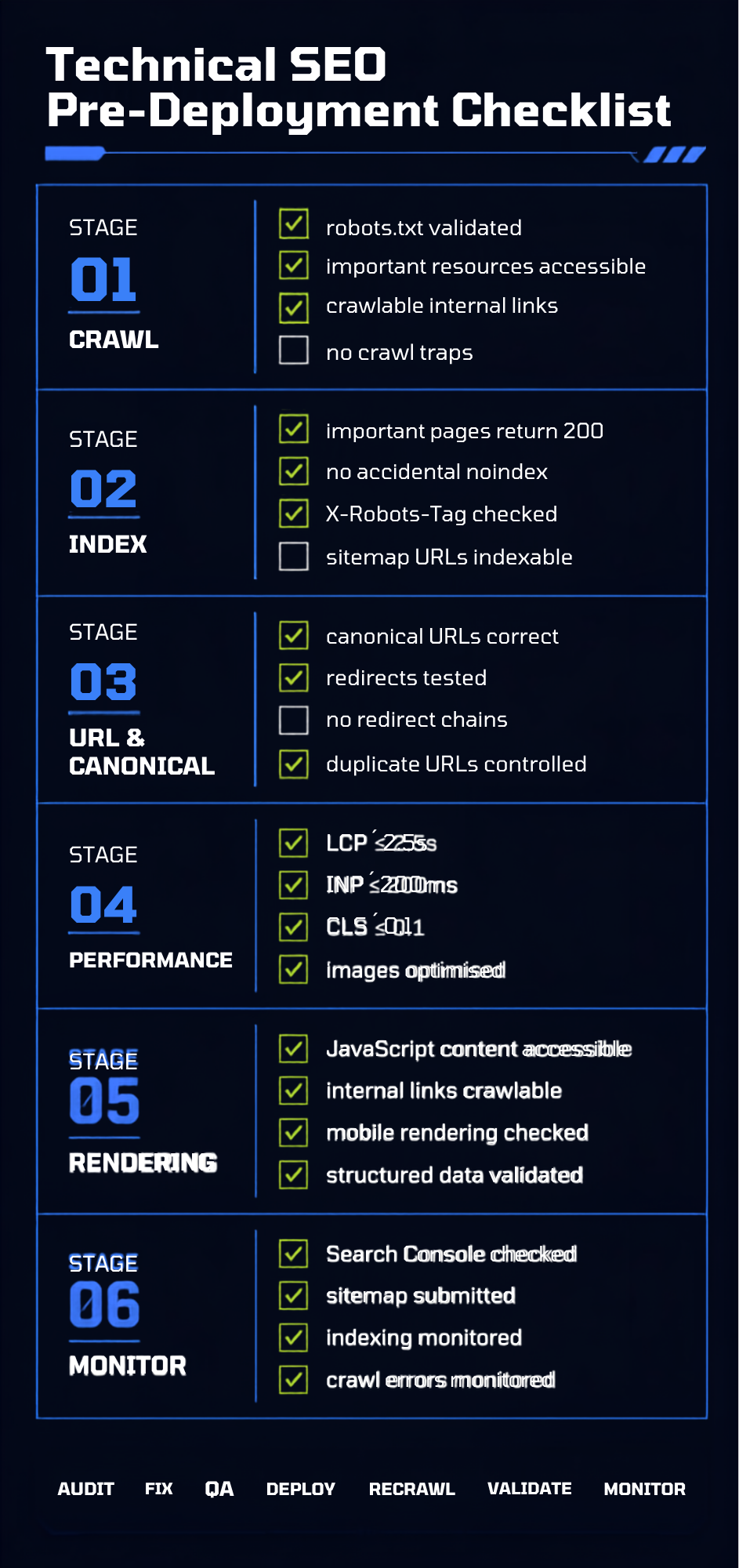
Technical SEO should be treated as a continuous engineering process rather than a one-time audit. After fixes are deployed, recrawl the website, validate critical URLs in Search Console, compare sitemap and indexation data, monitor Core Web Vitals and review organic performance for affected pages.
A sensible implementation cycle is:
Audit → Prioritize → Develop → QA → Deploy → Recrawl → Validate → Monitor
For major changes, keep a deployment log recording:
- Date
- Change
- URLs affected
- Expected SEO impact
- Developer
- Validation completed
- Search Console status
- Organic performance after deployment
This makes technical SEO measurable and makes future debugging considerably easier.
Final Technical SEO Checklist
If you need to reduce the entire guide to the essentials, check these 10 technical SEO foundations first:
- Can Googlebot crawl the important pages?
- Do important URLs return 200 OK?
- Are important pages indexable?
- Are canonical URLs correct and consistent?
- Does the XML sitemap contain only important canonical URLs?
- Can Google discover every important page through crawlable internal links?
- Does JavaScript leave critical content and links accessible?
- Are Core Web Vitals healthy on real users’ devices?
- Are duplicate, parameter and faceted URLs under control?
- Are Search Console, crawl and server data being monitored after changes?
If those ten areas are healthy, you have the foundation for a technically sound SEO architecture. From there, deeper work around crawl efficiency, JavaScript rendering, internationalization, structured data, server performance and large-scale URL management can be prioritized according to the size and complexity of the website.
Technical SEO is not about making a website look optimized to an SEO tool. It is about removing the technical barriers between your best content and the search engines and making sure the right pages are fast, accessible, understandable and indexable.
Ashvini Vyas is the founder of ACRevScalers and a B2B growth marketing strategist with nearly two decades of experience building revenue-aligned marketing systems for SaaS, technology, and B2B platforms across Australia, the US, and the UK. Her work spans go-to-market strategy, demand generation, and fractional CMO advisory, with a particular focus on translating complex, technical products into marketing that converts.
Related News


On-Page SEO Best Practices That Drive Real Results
Popular News